
Quick Answer: What is the best size for an email signature?
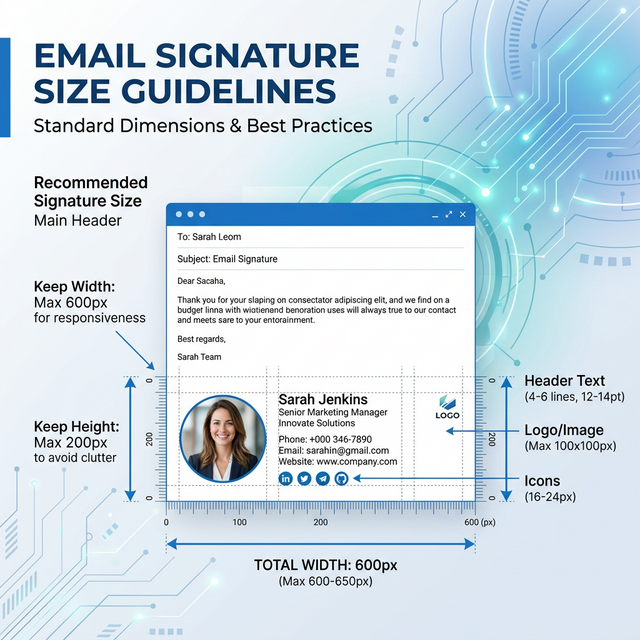
The best size for an email signature is between 320px and 450px in width and 150px to 200px in height. For high-DPI (Retina) clarity, images should be uploaded at double the display size (e.g., 200px wide for a 100px display) but restricted via HTML width attributes.
Technical Standards: The 'Golden' Dimensions
| Component | Standard Size | Why it works |
|---|---|---|
| Total Width | 320px - 450px | Fits the portrait view of 98% of modern smartphones without overflow. |
| Total Height | 150px - 200px | Prevents "Signature Fatigue" in long back-and-forth threads. |
| Max File Weight | Under 100KB (Total) | Reduces the risk of the email being marked as 'too heavy' or deferred by filters. |
The Retina Problem: Blurry vs. Sharp Logos
Have you ever noticed your logo looks "fuzzy" on an iPhone or a MacBook?
The Cause: High-DPI screens use twice as many pixels to render the same area. A 100px image will look blurry because the screen is trying to fill 200px of physical space.
The Fix: Use the 2x Strategy.
- Export your logo at 200px wide.
- Set the HTML attribute to
width="100".
- This packs 200 pixels of data into 100 pixels of space, resulting in crisp, high-definition branding.
Outlook-Specific Sizing Quirks
Microsoft Outlook (desktop versions) is notoriously difficult with sizing because it uses the Word engine for rendering. Our team has observed two critical behaviors:
- The DPI Scaling Blowup: If your image doesn't have a 96 DPI metadata flag, Outlook may scale it up by 125% or 150%, making your logo look massive.
- Line-Height Expansion: Outlook frequently ignores
line-heightin pixels. To prevent your signature from looking "stretched," we recommend usingmso-line-height-rule: exactly;within your table cell styles.
Mobile Responsiveness: The 450px Limit
Most mobile email clients (Gmail, Apple Mail, Outlook Mobile) reserve about 20-40 pixels for side gutters.
- Observation: If your signature is exactly 600px wide, most mobile users will have to scroll 150px to the right to see your social icons.
- Behavior-based reasoning: Users rarely scroll horizontally. If your CTA is on the right side of a wide banner, it will be missed.
- Pro Tip: Keep your primary contact info in the first 320px of width to ensure it is visible the moment the email is opened.
Image Specifications Checklist
- Are my icons 24px x 24px? (Standard for touch targets).
- Is my banner width 450px or less?
- Did I use the 2x strategy for my headshot?
- Is my combined file weight under 102KB? (To avoid Gmail clipping).
FAQ: Email Signature Sizing
Should I use percentages (100%) for width?
No. Many versions of Outlook do not support percentage widths on tables or images. Always use fixed pixel widths (e.g., width="400") for maximum stability.
What is the best format for small icons?
Use PNG-8. It supports transparency and is significantly lighter than PNG-24 or JPEG for small items like LinkedIn or Website icons.
Fix your sizing issues automatically
If you want a signature that is already sized perfectly for every device without you having to touch any code, use the InboxSign generator. It automatically implements the Retina 2x strategy and Outlook-specific spacing fixes.