

Quick Answer: What is Email Signature Marketing?
Email signature marketing is the strategic use of the footer space in business emails to promote content, drive website traffic, and convert recipients into leads using banners, CTAs, and social proof.
The Signature Marketing Framework:
- The Framework: Use the CTA-Banner-Proof system for maximum impact.
- The Goal: Drive actionable outcomes (Demo bookings, guide downloads, registrations).
- The ROI: Lower CPL than traditional ads because it leverages existing trust.
- The Scale: Centralized management via InboxSign ensures 100% brand consistency.
What is Email Signature Marketing?
At its core, email signature marketing is about Passive Lead Generation.
Most marketing channels require you to interrupt your audience's day—think of a YouTube ad or a cold call. Signature marketing is different. It piggybacks on a conversation that is already happening. When you send a helpful email to a client, they are naturally inclined to look at your signature to find your phone number or title. By placing a strategic offer there, you are presenting a solution at the exact moment of highest trust.
Turning a Sign-off into a Marketing Asset:
- Old Concept: A signature is for contact information only.
- New Concept: A signature is a personalized, high-conversion landing page.
By treating the space below your name as a marketing "slot," you can launch campaigns across your entire organization in minutes.
The Signature Marketing Framework (CORE)
To transform a signature from a plain-text sign-off into a high-performance asset, we recommend our proprietary CTA-Banner-Proof Framework. This system is designed to trigger visual attention, provide logical value, and build immediate credibility.
1. The Call to Action (Action)
This is the "What." It is the specific instruction you want the recipient to follow. A marketing signature without a CTA is just an business card. A marketing signature *with* a CTA is a lead generation tool. We recommend using benefit-driven language rather than generic instructions.
2. The Visual Banner (Attention)
Humans are visual creatures. A banner provides the visual weight needed to break the monotony of a text-heavy email. It acts as the "Hook" that draws the eye away from the body text and down toward your marketing message.
3. Social Proof (Trust)
Why should they click? Social proof—such as trust badges, review ratings, or client logos—provides the psychological safety needed to encourage a click from a busy professional. It answers the subconscious question: "Is this company legitimate?"
*Caption: The three core elements of a marketing-driven email signature*
Why Signature Marketing Works: The Psychology
Why is this channel so effective at generating results? It relies on three fundamental psychological principles:
1. Repeat Exposure (The Mere Exposure Effect)
People tend to develop a preference for things merely because they are familiar with them. While a single banner might be ignored, when a prospect sees your "New Product Launch" banner in five different emails over a week, they are significantly more likely to click it on the sixth. It builds familiarity without being intrusive.
2. High-Intent Context
Email is personal. When someone reads your email, their attention is focused. Unlike a social media feed where they are scrolling past hundreds of posts, your email is a one-on-one environment with zero competition for attention. Your message occupies 100% of their focus.
3. The Halo Effect (Authority)
By attaching a marketing message to a message from a real human, you benefit from the Halo Effect. The recipient trusts the sender, and that trust is extended to the banner at the bottom. This bypasses the "ad blindness" that ruins traditional display advertising.
CTA Strategy: Generating Clicks
The difference between a 0.1% click-through rate and a 3.0% click-through rate is almost always the Copy.
To create a high-conversion CTA, you must use Action-Based Language. Avoid passive phrases like "Click here." Instead, focus on the immediate value or outcome the recipient will receive from clicking.
Proven CTA Formulas for Signatures:
- The Outcome: "🚀 See how to save 10 hours a week"
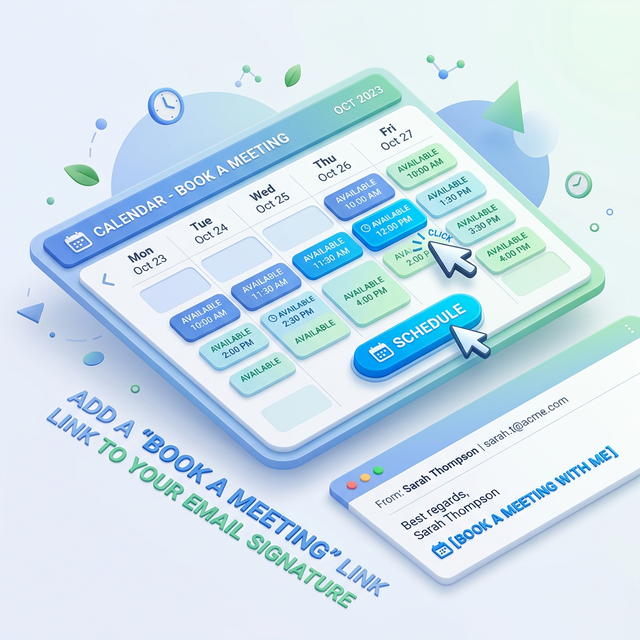
- The Action: "📅 Grab a 15-minute slot on my calendar"
- The Scarcity: "⏳ Register before the webinar fills up"
- The Curiosity: "🔍 Peek inside our 2026 strategy roadmap"
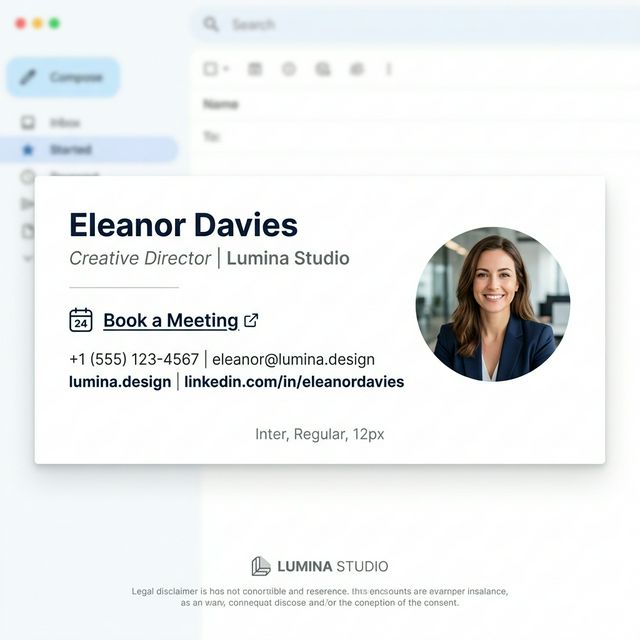
*Caption: Strong CTA placement inside an email signature ensures the next step is unmistakable and friction-free.*
[!TIP]
Pro Tip: Use a bold emoji at the start of your CTA. Symbols like 🚀, 📅, or 👉 increase "visual friction" and draw the eye toward the link without looking unprofessional.
Banner Strategy: The Visual Hook
Your banner is your "Billboard in the Inbox." However, unlike a highway billboard, it must be respectful of the recipient's viewing experience.
Pro Design Rules for Signature Banners:
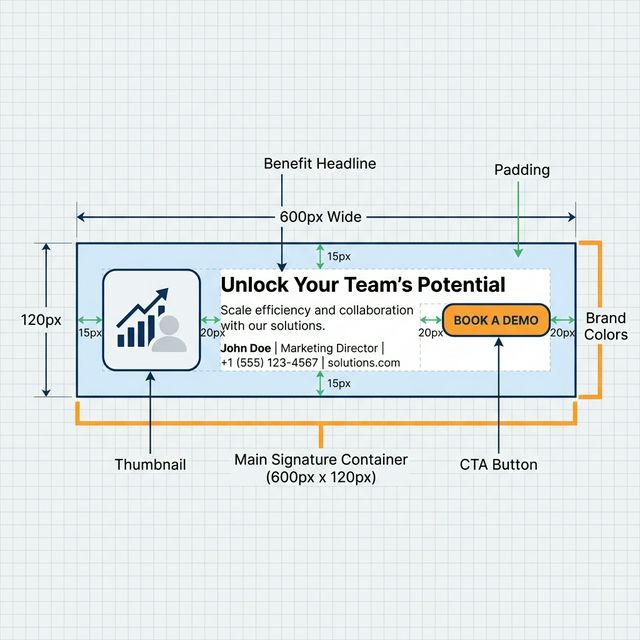
- Strict Sizing: The ideal size is 600px x 120px. This width is the "Goldilocks Zone"—wide enough to be legible but narrow enough to fit on mobile screens without being clipped.
- The 'Three Second' Rule: A recipient should understand your offer within three seconds of seeing the banner. Use minimal text and high contrast.
- Visual Alignment: Ensure your banner follows your brand's color palette. A "clashing" banner looks like spam; a "harmonious" banner looks like a premium feature.
- Integrated Buttons: Don't just make the whole image a link. Draw a button *within* the image. It signals to the recipient that the element is interactive.
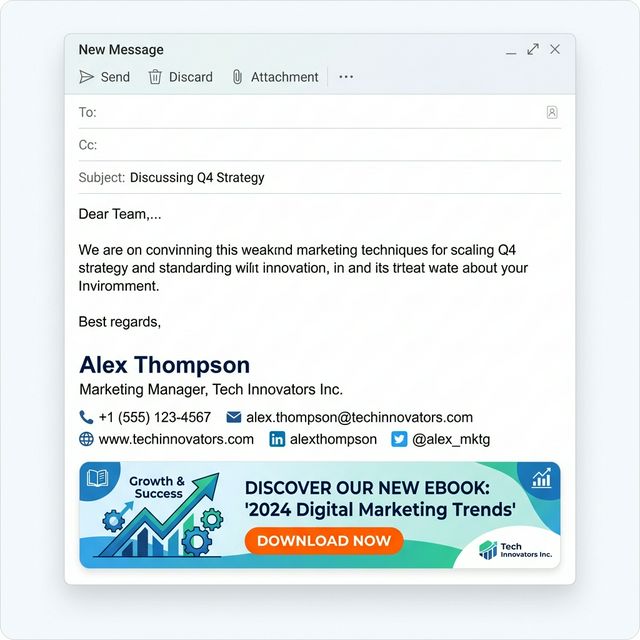
*Caption: Example of a high-converting email signature banner designed for maximum impact and mobile readability.*
Social Proof Strategy: Building Instant Credibility
Social proof is the "Logic" that backs up your "Offer." If your CTA asks for a demo, your social proof should signal that others have already enjoyed the experience.
Common Types of Signature Social Proof:
- The Star Rating: A simple Trustpilot or G2 star rating (e.g., "4.9/5 stars").
- The Industry Badge: "Gartner Leader" or "Top Rated HR Software 2026."
- The Customer Volume: "Trusted by 10,000+ professionals daily."
- The Media Logo: "As seen in Forbes and TechCrunch."
*Caption: Adding social proof badges like G2 or Trustpilot directly below your contact info increases trust and overall conversion rates.*
Real-World Campaign Examples
Not sure what to promote? Signature marketing is incredibly versatile. Here are four proven campaign types used by high-growth companies:
1. The SaaS Product Demo Campaign
The Goal: Drive sales calls.
The Signature: A bolded "📅 Book a 15-minute Discovery" text link paired with a banner showing a high-value product feature. This is ideal for Sales and Account Management teams.
2. The Thought Leadership Campaign
The Goal: Build brand authority and capture top-of-funnel leads.
The Signature: "Download our 2026 Industry Outlook Guide." Pair this with a banner featuring the guide cover. This is perfect for Marketing and Executives.
3. The Event / Webinar Campaign
The Goal: Maximize attendance.
The Signature: "Register for our upcoming workshop." This campaign is time-sensitive and should be swapped out as soon as the event concludes.
4. The Recruitment Campaign
The Goal: Source high-quality candidates.
The Signature: "We are hiring! See our open roles 🚀." This is surprisingly effective because recipients are often in similar industries to your own employees.
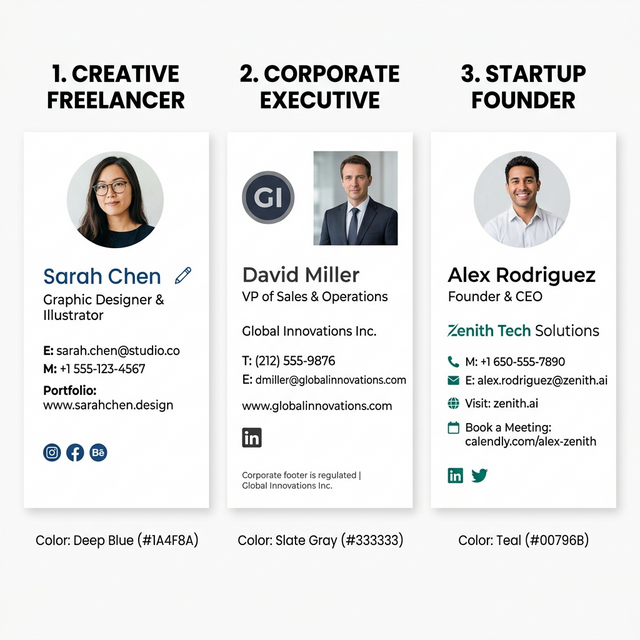
*Caption: Different types of signature marketing campaigns tailored for sales, HR, and marketing objectives.*
How to Build a Marketing Signature (Step-by-Step)
Execution is everything. Building a marketing-grade signature manually leads to formatting bugs and broken images. Follow this 5-step implementation plan:
- Define Your Primary Goal: Choose one action (e.g., Guide download). Do not try to promote multiple things at once.
- Design the Banner: Use a 600x120px canvas. Ensure the file size is under 100KB to maintain email deliverability.
- Draft Your Copy: Use the "Benefit-Driven" formula for your CTA text.
- Generate the Code: Use the InboxSign generator to assemble these elements. Our generator handles the complex HTML table structures needed for email client compatibility.
- Centralize Deployment: If you are a team leader, use a signature management system to push this update to everyone at once.
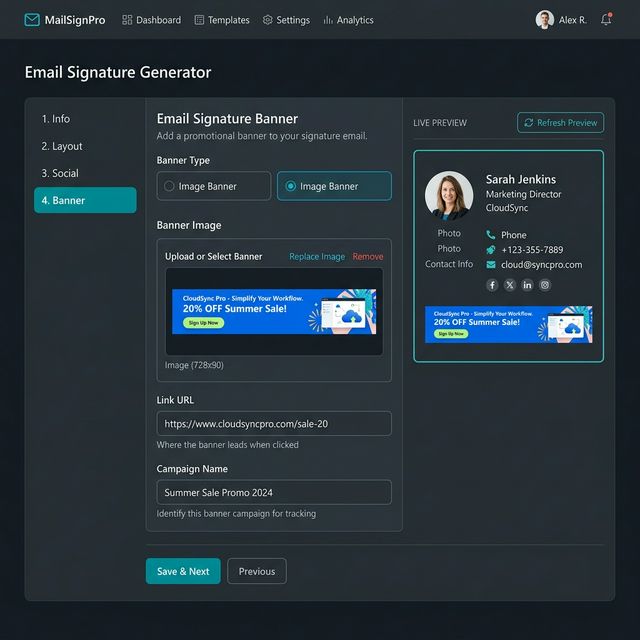
*Caption: Building a marketing-ready signature using the InboxSign generator ensures technical stability and cross-client compatibility.*
Tracking Performance: Proving the ROI
If you aren't tracking your signature clicks, you are guessing. To justify the time spent on signature marketing, you must be able to prove its impact on the bottom line.
The UTM System
Always append UTM parameters to every link in your signature. This allows you to see exactly where your traffic is coming from in GA4.
Example: ?utm_source=email_signature&utm_medium=footer_banner&utm_campaign=winter_demo_promo
What to measure:
- Total Clicks: The volume of traffic generated.
- Click-Through Rate (CTR): The efficiency of your banner design.
- Conversion Rate: The percentage of signature visitors who become leads on your landing page.
- Attributed Revenue: In many CRMs, you can attribute closed deals back to the "Signature Marketing" channel.
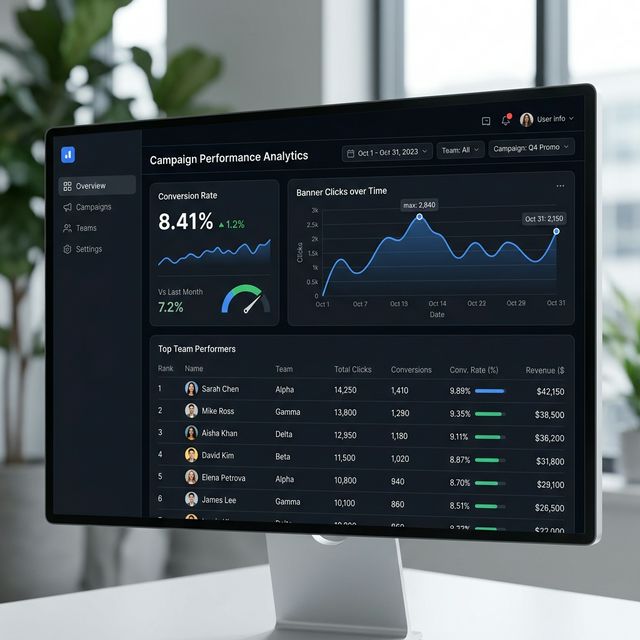
*Caption: Tracking the performance of email signature marketing campaigns allows you to prove marketing impact to leadership and optimize results.*
Common Mistakes: The 'Conversion Killers'
Avoid these pitfalls to maintain a high-performance signature:
- The "Clashing" Color Palette: Your signature should look like part of your brand, not a ransom note. Use consistent hex codes.
- Dead Links: Promoting a webinar that ended three weeks ago kills your credibility. Update your campaigns regularly.
- Oversized Images: A 2MB banner is a spam filter trigger. Always optimize images using WebP or compressed PNG formats.
- Ignoring Mobile: If your signature is 800px wide, it will look broken on every smartphone. Stick to the 600px rule.
The Marketing Signature Setup Checklist
- Banner Size: Is the width 600px or less?
- One Goal: Does the signature have a single, clear CTA?
- Mobile Responsive: Have you tested the layout on an iPhone or Android?
- Proof Included: Are you using trust signals (Ratings, logos)?
- Tracking Active: Do all links include UTM parameters?
FAQ: Email Signature Marketing Strategy
How often should I change my signature campaigns?
We recommend rotating banners every 4–6 weeks. This prevents "Banner Blindness" among your frequent contacts and keeps your branding feeling fresh and active.
Does signature marketing work for outbound sales?
Yes, but with caution. For cold outreach, keep the signature minimal. For warm follow-ups, a helpful resource banner (like a case study) can dramatically increase conversion rates.
Can I include my LinkedIn profile and a banner?
Yes, but maintain a clear visual hierarchy. Put your LinkedIn icon in the contact stack and the banner at the very bottom so they don't compete for the eye's attention.
Turn Every Email into a Lead Generation Channel
Instead of manually fighting with broken HTML and inconsistent formatting, use InboxSign to build a modern marketing signature system. We provide the templates, the hosting, and the tracking tools you need to professionalize your footer in minutes.
Stop wasting your digital real estate. Start generating leads with every "Send" by building your marketing signature with InboxSign today.