

Quick Answer: Is Your Signature GDPR-Compliant?
To ensure your email signature meets GDPR standards, follow these four pillars of compliance:
- Data Minimization: Only include essential professional info (Name, Title, Company).
- Transparency: Add a clear link to your company's Privacy Policy.
- Disclosure: Disclose any tracking tech (like pixels) in your data policy.
- Security: Ensure all hosted assets (logos/icons) use secure HTTPS protocols.
What is GDPR in Simple Terms?
Before we look at pixels and phone numbers, it's important to understand the landscape. The GDPR is a comprehensive data protection law that applies to any organization—regardless of location—that processes the personal data of individuals located in the European Union (EU) and the European Economic Area (EEA).
In simple, non-legal terms:
- Data Protection: It’s about giving people control over their information.
- Universal Reach: Even if your office is in New York, if you email a client in Berlin, GDPR standards apply.
- Email Communication: Your daily business emails are one of the primary ways you handle and exchange data.
Why Email Signatures Matter for GDPR Compliance
Your signature is more than a digital business card; it is a recurring data exchange point. Every time you send an email, your signature contributes to:
- Repeated Exposure: Unlike a website landing page a user visits once, your signature is seen dozens of times per week by the same recipient, cementing their perception of your privacy standards.
- Personal Data Sharing: You are effectively "publishing" your personal data (and that of your employees) to every recipient you contact.
- Active Tracking: If you use "Open" or "Click" tracking in your signature, you are monitoring behavior. Under GDPR, this is a distinct data processing activity that requires a lawful basis.
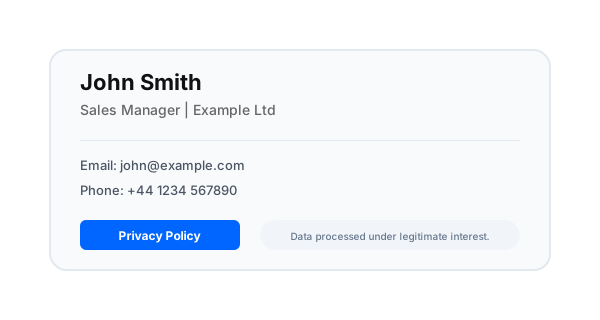
*Caption: Example of a GDPR-compliant email signature layout with clear identity and mandatory transparency links.*
Does GDPR Actually Require a Signature?
Technically, no. The GDPR does not have a specific clause saying "you must have an email signature."
However, other regulations (like the EU e-Commerce Directive) and professional norms make them mandatory because:
- Transparency Requirements: You must identify who is sending the communication on behalf of a business.
- Duty of Information: GDPR Articles 13 and 14 require you to inform people how you handle their data. A link in your signature is the most efficient way to fulfill this.
- Company Disclosure: In many jurisdictions (like Germany with the *Impressum*), certain corporate details are legally required in the footer.
Personal Data: What's Hiding in Your Footer?
Under GDPR, personal data is any information that can identify a living person. Most professionals don't realize how much data they are leaking:
- Identifiable Emails:
jane.doe@company.comis personal data.info@company.comis generally not.
- Direct Contact Lines: Your personal mobile number and direct office extension are high-value personal identifiers.
- Professional Photos: A headshot is biometric-adjacent data that clearly identifies an individual.
The Rule of Data Minimization:
Only include what is strictly necessary for the recipient to contact you professionally. Avoid including home addresses, personal social media links, or secondary private phone numbers.
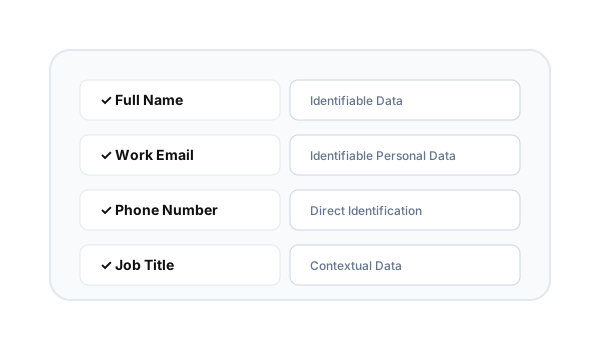
*Caption: Common personal data elements found in email signatures that must be handled under GDPR guidelines.*
The Tracking Section: Pixels & Privacy
Many SaaS signature tools use invisible 1x1 tracking pixels to notify users when an email has been opened.
The GDPR Interpretation:
Tracking a recipient's location, device type, and open-time is considered "processing." To do this legally, you need a Lawful Basis:
- Legitimate Interest: Standard B2B communication often falls under this. You have a reason to know if your client received the invoice.
- Disclosure: Even with legitimate interest, you must disclose this tracking in your privacy policy.
[!TIP]
Instead of manually managing compliance, use InboxSign's structured templates to ensure every employee follows GDPR-friendly standards automatically.
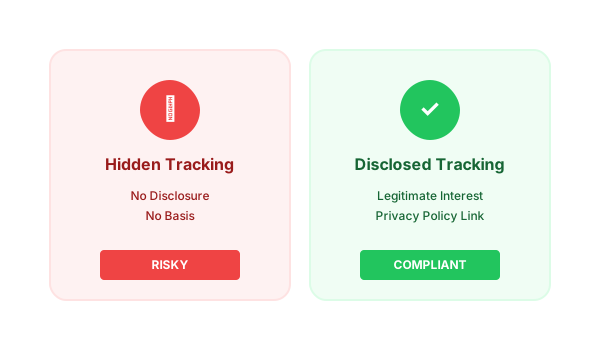
*Caption: Email tracking is considered data processing. Transparency and disclosure are required to maintain compliance.*
How to Make Your Signature GDPR-Compliant (Step-by-Step)
- Standardize Your Identity: Use your full professional name and official job title.
- Add the 'Privacy Policy' Link: Place a clear, hyperlinked text line (e.g., "See our Privacy Policy") at the very bottom of the signature.
- Minimize the Stack: Remove any non-essential personal identifiers (like a personal Instagram or a private cell number).
- Audit Your Links: Ensure every icon and banner points to a secure HTTPS destination.
- Disclose Tracking: Update your data policy to include how signature tracking data is used and stored.
GDPR-Compliant vs. Non-Compliant Signature
The difference between a "Legal Risk" and a "Professional Standard" is often just a few lines of code.
| Element | Non-Compliant (Risk) | GDPR-Compliant (Standard) |
|---|---|---|
| Tracking | Hidden, non-disclosed tracking pixels. | Disclosed tracking with policy link. |
| Data | Includes personal home address/WhatsApp. | Limits to official business contact only. |
| Policy | No mention of data rights. | Clear link to the Data Rights Policy. |
| Hosting | HTTP (Unsecured) image links. | HTTPS (Secured) asset hosting. |
| Consistency | Every employee has a different layout. | Unified, company-wide compliance. |
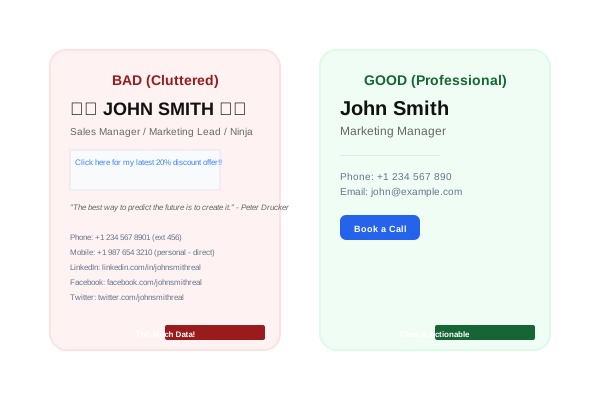
*Caption: A streamlined, compliant signature (right) reduces data exposure while maintaining a higher professional authority than a cluttered, non-compliant version (left).*
The Compliance Checklist for SaaS Teams
Before rolling out your new signatures, perform this audit:
- Privacy Link: Is the link visible and clickable?
- Data Minimized: Have you removed non-essential personal cell numbers?
- Tracking Disclosed: Is your Google Analytics or Click Tracking mentioned in your policy?
- HTTPS Only: Are all logos hosted on a secure server?
- Unified Format: Is every employee using the exact same compliant template?
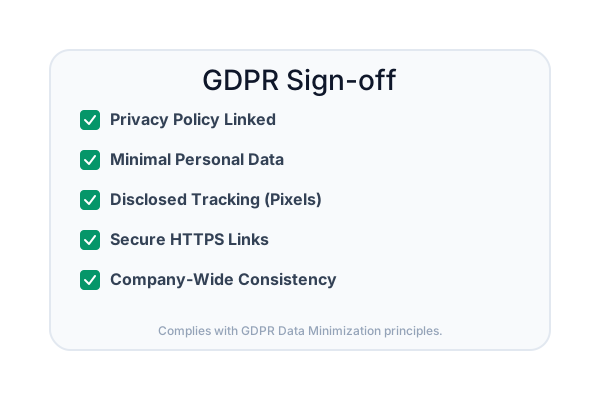
Company-Wide Control: The Ultimate Compliance Safety Net
For B2B teams, the biggest risk isn't the signature itself—it's inconsistency. When 100 employees manage their own signatures, you have 100 different points of potential data leakage. This is where email signature disclaimers alone often fail; without central control, even the best legal text can be omitted or broken by an end-user.
Using a centralized management system allows your legal or marketing team to push out a single, pre-vetted, compliant template to the entire company in one click. This ensures that no matter who sends an email, your brand is protected and compliant.
Future-Proof Your Professional Identity
Compliance shouldn't be a technical burden. Create a consistent, privacy-friendly email signature across your organization using InboxSign. We handle the HTTPS hosting, the structured layouts, and the compliance-first templates so you can focus on building your business with total peace of mind.
Stop guessing with compliance. Start sending with confidence by launching your compliant signature generator today.
*Technical and legal review completed for 2026 data privacy standards.*