
Quick Answer: Do Email Disclaimers Actually Work?
Legally, an email disclaimer is a "shield, not armor." It provides a layer of protection by signifying intent and establishing professional boundaries, but it is rarely a standalone legal contract.
For maximum effectiveness, a disclaimer must:
- Warn unauthorized recipients about confidentiality.
- Limit liability for negligent misstatements (informal advice).
- Distinguish employee opinion from corporate policy.
- Maintain compliance with regulations like GDPR or HIPAA.
1. Are Email Disclaimers Legally Enforceable?
One of the most common questions in corporate compliance is whether these footer notices actually hold up in a courtroom. The reality is that they are rarely "legally binding" in the same way a signed contract is, but they serve as critical supporting evidence.
The Contract Law Reality
In most jurisdictions (including the US, UK, and EU), a contract requires *mutual agreement*. Since a recipient hasn't signed your disclaimer before receiving your email, they aren't technically bound by it. However, courts often look at "intent." By including a disclaimer, you are clearly stating your intent that the message is private, which can be used to prove that a recipient knew they were handling sensitive data inappropriately.
Jurisdiction Note
- US Law: Courts generally look at the "reasonable expectation of privacy." A disclaimer helps establish that expectation.
- UK/EU (GDPR): In Europe, disclaimers are used to fulfill the "Duty of Information" under GDPR standards. They often include links to privacy policies to show transparency in data handling.
2. Types of Professional Email Disclaimers
A generic, one-size-fits-all legal block is often ignored. To increase authority and protection, you should match your disclaimer type to your business function.
Confidentiality & Privilege Notice
This is the standard "professional hygiene" notice. It is designed to protect privileged communication between parties (such as attorney-client privilege) and tells unintended recipients to delete the message.
- Scenario: A legal assistant accidentally CCs the wrong "John Smith" on a sensitive litigation file.
Liability for Negligent Misstatement
Essential for consultants, doctors, and engineers. It clarifies that any advice or "tips" shared via email are informal and should not be treated as a formal professional consultation.
- Scenario: A structural engineer gives a "quick opinion" on a wall's stability via email that later fails.
Employer Liability (Personal Opinion)
Prohibits the company from being held liable for an employee's personal remarks, defamatory statements, or "out of scope" promises.
- Scenario: An employee uses their work email to express a controversial political opinion that reflects poorly on the brand.
GDPR & Data Protection Disclaimer (New for 2026)
With strict privacy laws, including a line about how you process the recipient's data (or linking to your privacy policy) is now a baseline requirement for EU-facing businesses.
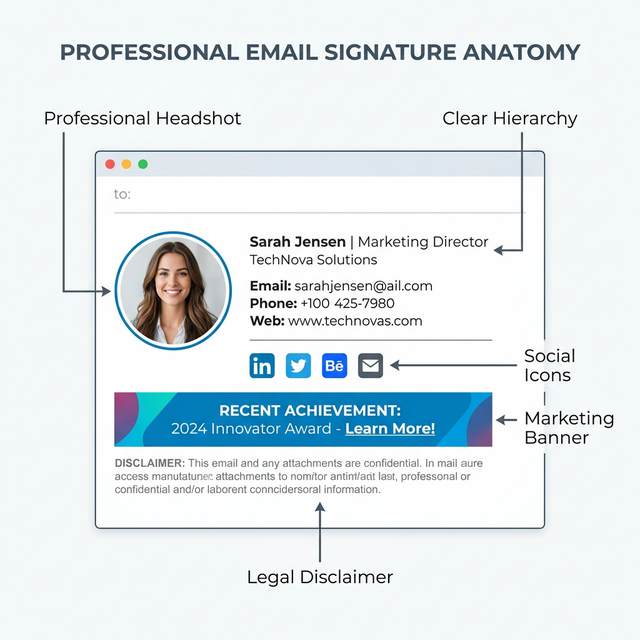
*Caption: A professional disclaimer should be integrated into the visual hierarchy, not overwhelm it.*
3. Email Disclaimer Templates (Copy & Paste)
Below are four pre-vetted templates for your signature generator. Choose the one that best fits your brand's risk profile.
Template 1: Short Professional (Best for Startups)
Confidentiality: This message (including attachments) is for the intended recipient only. If you received this in error, please notify the sender and delete this email.
Template 2: Detailed Corporate (Best for Established Firms)
Legal Notice: This email and any files transmitted with it are confidential and intended solely for the use of the individual or entity to whom they are addressed. If you have received this email in error, please notify the system manager. This message contains confidential information and is intended only for the individual named. If you are not the named addressee, you should not disseminate, distribute, or copy this e-mail.
Template 3: GDPR-Friendly (Best for EU/UK Business)
Privacy & Data: We value your privacy. This email is processed in accordance with our [Privacy Policy]. If you wish to exercise your data rights or unsubscribe from future communications, please contact our DPO at [Email Address].
Template 4: Minimal Modern (Best for Creative Agencies)
Privileged: Private & Confidential. | View our full legal disclaimer here
4. How to Write an Effective Disclaimer
If you choose to write your own, follow these step-based rules to ensure it remains professional and readable:
- Keep it Short: Anything over 4 lines won't be read. If you need more space, use a hosted HTML link.
- Use Plain Language: Avoid heavy "legalese" that confuses the recipient. Clear instructions like "delete if received in error" are more effective in court.
- Match Your Industry: A florist doesn't need a medical advice disclaimer. Identify your primary risk (confidentiality, advice, or branding) and focus on that.
- Avoid ALL CAPS: Writing your disclaimer in all caps doesn't make it more legal; it just makes it harder to read and looks unprofessional.
5. Where to Place Your Disclaimer
UX research shows that recipients scan emails in an "F" pattern, focusing on the top and left.
- The Bottom Rule: Always place the disclaimer at the very bottom of your signature, beneath your icons and size-optimized logo.
- Why Top Placement Fails: Placing legal text at the top of an email signature interrupts the flow of the conversation and makes the sender look defensive even before the message is read.
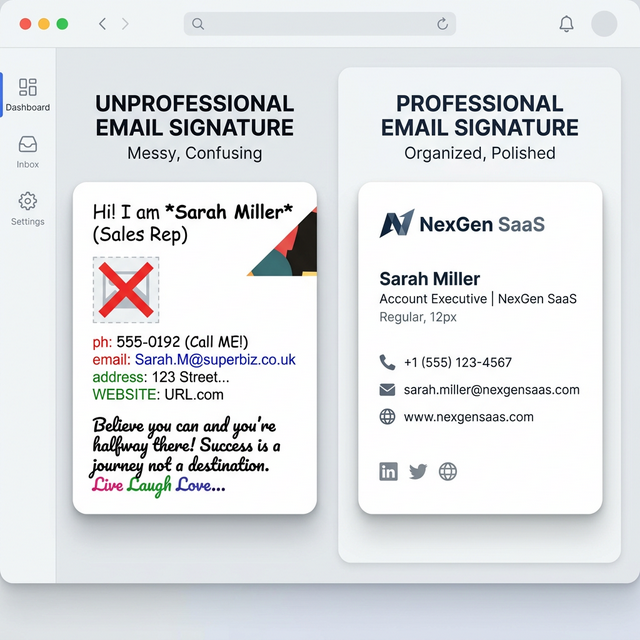
*Caption: Modern documentation favors the "Short & Linked" approach over massive blocks of unreadable text.*
6. Common Disclaimer Mistakes
- Copying Generic Text: Copying a generic block from a 2005 blog post often misses modern references to GDPR or mobile-first formatting.
- Trapping Text in an Image: If your disclaimer is part of an image file, it is invisible to search engines, screen readers, and email clients that block images. Always use standard HTML text.
- Ignoring "Thread Bloat": In a 20-email thread, a massive disclaimer appearing 20 times makes the conversation impossible to read on a mobile device.
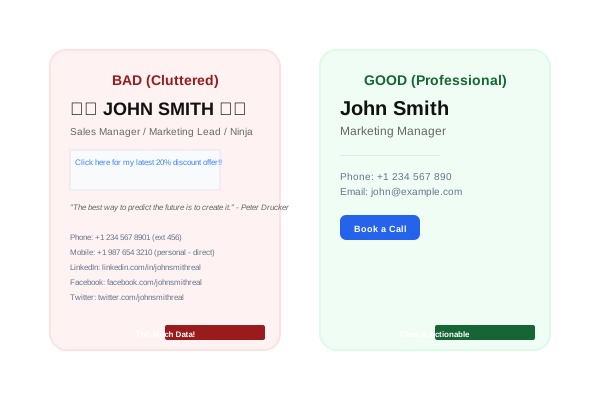
*Caption: Excessive disclaimer length creates "thread bloat" and kills mobile usability.*
7. Do Email Disclaimers Actually Protect You?
As a final word of expert advice: Email disclaimers help, but they do not replace formal legal documents.
If you are sharing a trade secret, you need a signed Non-Disclosure Agreement (NDA). If you are finalizing a $100k contract, you need an electronic signature on a formal master service agreement. Use your email disclaimer as a "first line of defense" that signals your company's professionalism and respect for data privacy, but never rely on it as your *only* line of defense.
Frequently Asked Questions (FAQ)
Are email disclaimers legally binding?
While they are typically not considered legally binding contracts on their own, they are valuable in court to demonstrate intent and professional standards.
Do email disclaimers prevent lawsuits?
No, but they provide important context that can be used to mitigate damages or prove that a recipient was warned about certain risks or confidentiality.
Can I copy a disclaimer from another company?
Not recommended. A law firm's disclaimer is vastly different from a marketing agency's. Tailor yours to your industry.
Should small businesses use disclaimers?
Absolutely. A disclaimer is a zero-cost way to project authority and handle basic liability and HIPAA/GDPR transparency.
Are disclaimers required by law?
In most cases, no. However, specific regulations like the IRS Circular 230 or European consumer laws may require certain disclosures.
Do disclaimers work internationally?
The weight varies significantly. For example, EU courts are much stricter about how disclaimers affect consumer rights compared to US courts.
Instead of dealing with formatting issues manually, tools like InboxSign help you generate signatures with pre-vetted, professional disclaimers that work across Gmail and Outlook without breaking your HTML layout.