

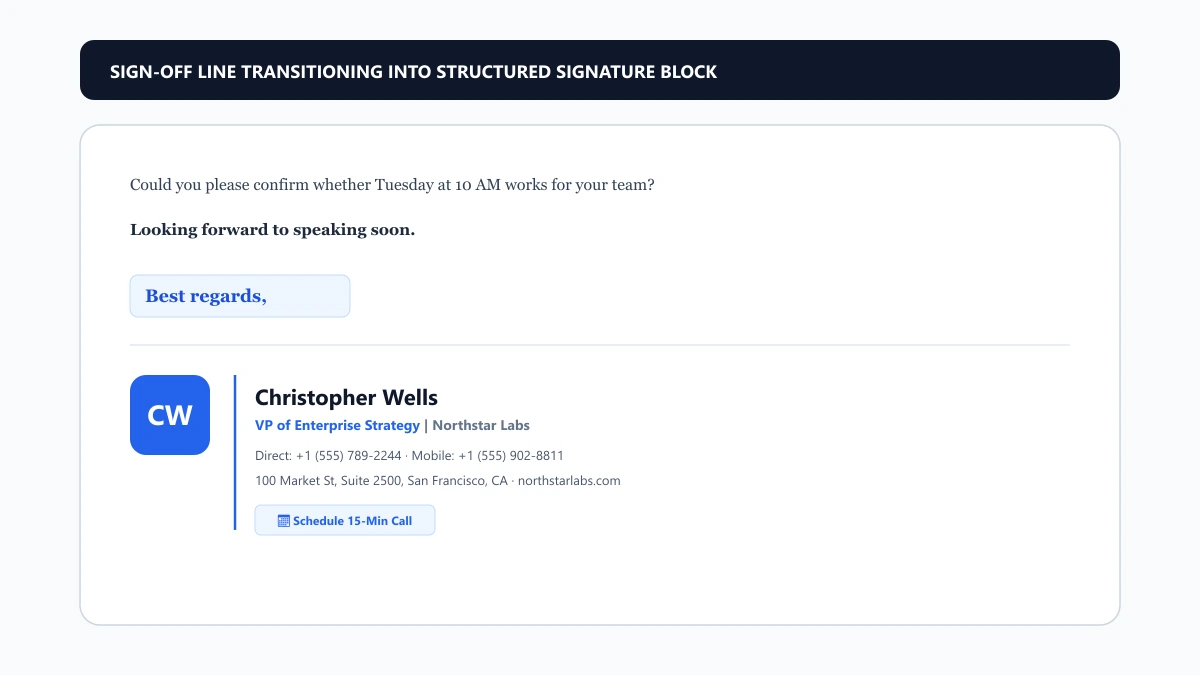
Every workplace email should conclude with intentional structure. Treating your closing as a two-step sequence eliminates ambiguity:
- The Pre-Closing Line (Call to Action / Next Step): Tells the reader exactly what happens next. Whether you need a decision by 3 PM Friday, want them to review an attached report, or are confirming that no response is necessary, state it here.
- The Sign-Off Phrase: A one-to-three word courtesy salutation (e.g., *Best regards,* *Sincerely,* *Warmly,*) that transitions smoothly into your typed name and contact information.
text
[Closing Line] Looking forward to reviewing the proposal with your team on Thursday.[Sign-Off] Best regards,
[Signature] Sarah Jenkins
Director of Product Marketing | Meridian Labs
How to Choose a Closing by Relationship & Context
Choosing the right closing depends on four key factors:
- Power Distance & Hierarchy: When writing upward to senior leadership, an executive board, or a judge, maintain formal distance (*Respectfully,* *Sincerely,*). When writing to direct peers or team members, approachable brevity works best (*Best,* *Thanks,*).
- Familiarity & History: In a first cold message, err on the side of caution with *Best regards,*. Once an active back-and-forth thread is established, dropping down to *Best,* or *Cheers,* reflects natural conversational rapport.
- Email Intent & Sentiment: If you are delivering difficult news, resolving a service outage, or offering an apology, cheerful phrases like *Have a great weekend!* or *Cheers,* are tone-deaf. Use empathetic, measured closings (*With sincere apologies,* *Respectfully,*).
- Industry Norms: Legal, financial, and academic institutions skew formal. Technology startups, media agencies, and creative studios typically welcome informal, warm closings.
Email Closings Mapped to Common Workplace Situations
Use this matrix to match your closing line and sign-off directly to your recipient:
| Situation | Recommended Closing Sentence | Recommended Sign-Off |
|---|---|---|
| Cold Outreach & Sales | "Open to a quick 10-minute introductory call next Tuesday?" | Best regards, |
| Executive & Board Updates | "Please let me know if you would like me to prepare additional data." | Respectfully, |
| Client Deliverables | "The updated assets are attached for your review. Let us know your thoughts." | Warm regards, |
| Internal Team Collaboration | "Catch you at the standup tomorrow morning." | Best, |
| Apology & Issue Recovery | "We deeply regret the disruption and appreciate your continued patience." | Sincerely, |
| Follow-Up on Unanswered Note | "Checking in to see if you had a chance to review the questions below." | Kind regards, |
| Time-Sensitive Request | "Could you please confirm approval by 2 PM so we can meet the print deadline?" | Thanks in advance, |
Common Closing Mistakes to Avoid
- Outdated Victorian Closures: Phrases like *Yours faithfully,* *Yours truly,* or *I remain your humble servant* belong in 19th-century paper letters. In digital business communication, they read stiff, archaic, and detached.
- Passive Clichés: Avoid ending with *Please do not hesitate to contact me.* It adds filler without value. Instead, use active clarity: *Feel free to call my mobile if questions come up before tomorrow.*
- Capitalization Errors: Only capitalize the first word of your closing phrase. Write *Best regards,* not *Best Regards,*.
- Missing Commas: Place a comma after your sign-off before your name. Omitting it looks rushed.
- Abruptly Dropping Sign-Offs on First Contact: While ongoing internal threads can drop sign-offs, omitting one in cold or formal correspondence comes across as curt or dismissive.
---
Connecting Your Sign-Off to Your Signature Block
Your sign-off marks the exact boundary where your message text ends and your corporate identity begins. Once you select the appropriate closing phrase, transition into a verified signature block that provides essential details without manual typing.
Instead of typing out raw text links or messy phone numbers, use our free email signature generator to produce a responsive, corporate-compliant signature. A clean layout ensures your name, title, headshot, direct phone, and calendar scheduling link render reliably across Outlook, Gmail, Apple Mail, and mobile devices.
Explore Related Guides in This Cluster
- For day-to-day team chats, Slack banter, and casual office humor, browse 60+ Funny Email Sign-Offs: Safe, Risky & Unhinged Closings.
- For an exhaustive guide to the most popular business sign-off—including grammar rules, capitalization, and head-to-head comparisons—read Best Regards: Meaning, Rules, Alternatives & Comparison.
- For career-defining messages, investor updates, and enterprise client relations, consult our curated guide to Professional Email Sign-Offs: Business Closings by Context.
- To review comprehensive standards for email layout, font choices, and sign-off etiquette, see our Email Signature Etiquette: Do's & Don'ts.
- Need to test your subject line or generate compliant email footers? Check out our complete directory of free email tools.


